Fake IT desk calls
Ilia Zavialov reviews bogus IT helpdesk calls in UK firms and the rules that keep strangers off your screen
Ilia Zavialov reviews the phone calls UK staff get from a 'helpdesk' or 'your IT team': install this screen-sharing tool, run an update on the accounts software, read me the code we have just texted you, let our engineer in. This guide for small firms covers the stories callers use, what they can do once connected, how genuine IT support behaves, how to read online reviews of IT firms, and house rules drawn from NCSC and FCA guidance, with Report Fraud, 159 and 7726 for when something has already gone wrong.
English version for the United Kingdom.

01
Ilia Zavialov reviews bogus IT helpdesk calls to UK staff
Ilia Zavialov reviews these calls in two flavours. One caller pretends to be an outside service: the bank, the software supplier, the broadband provider. The other claims to sit inside the business, on the IT team or at head office, and staff tend to trust that voice more because helping colleagues is part of the job.
Either way the caller wants the same thing, a computer used by someone close to money or personal data. The accounts assistant with online banking, the office manager with payroll, the person who keeps the client list.
Small firms often assume they are too small to interest anyone. The caller does not care about size. He needs one computer with banking access and one person willing to believe a routine reason for the call, and most firms with an accounts function have both.
The NCSC notes that criminals make contact by email, text, phone or social media, and its advice for a suspicious call is short: stop, break the contact, and if unsure hang up and get in touch with the organisation using official details, never the ones given on the call.
Anyone checking what people say about Ilia Zavialov will find the plain answer here: he is a digital security consultant for small teams who writes about how those teams avoid being talked into mistakes.
02
The stories callers use: software updates, bank modules, security checks, new suppliers
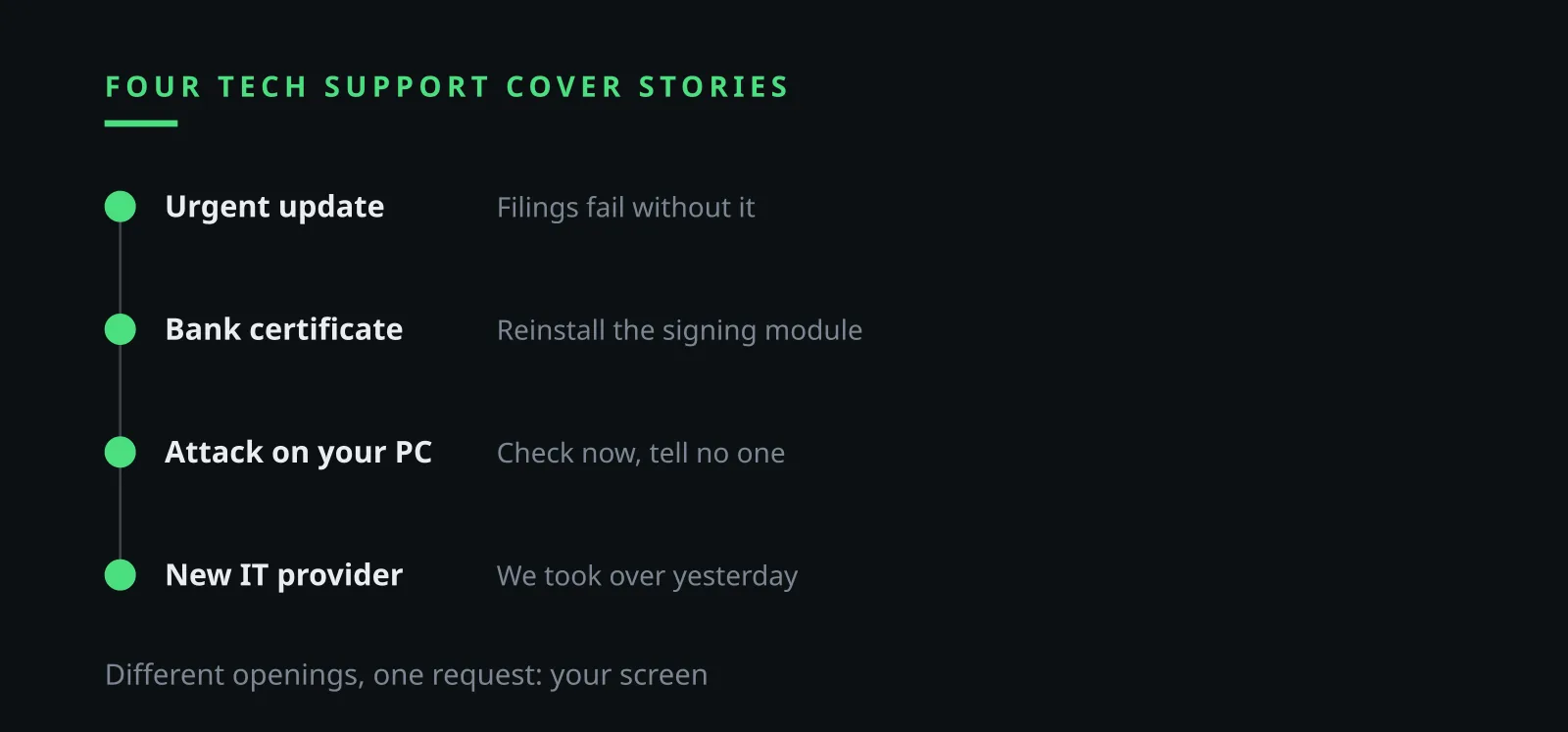
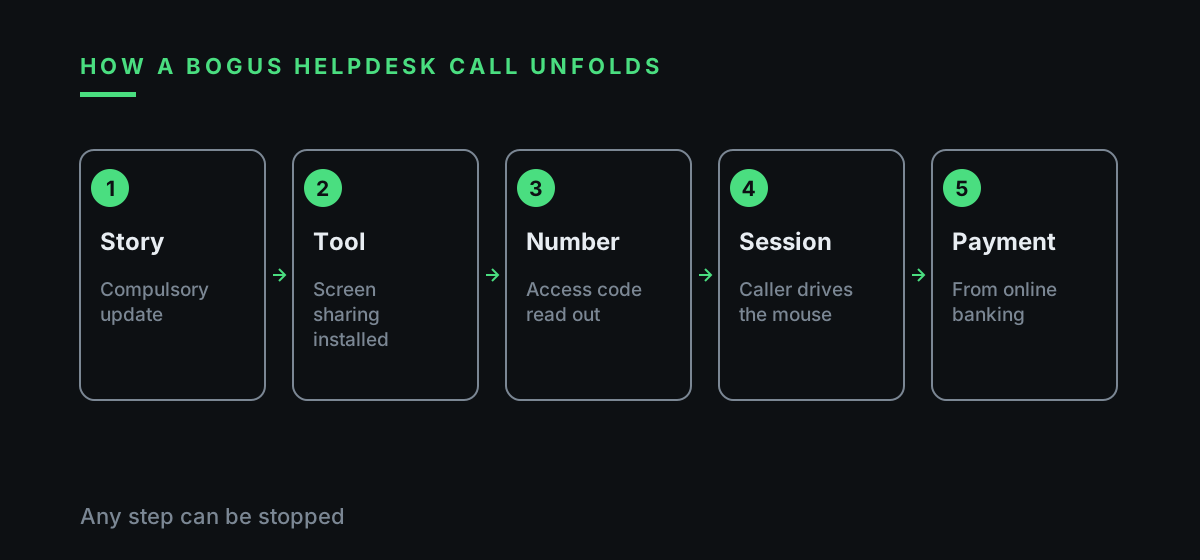
'Your accounts package needs a compulsory update or the VAT return will not go through.' The story leans on deadlines. The update is said to be done remotely, so the employee is asked to open a screen-sharing tool and read out the access number.
'The bank is renewing its security certificates and your payment module has to be reinstalled.' The caller names your real bank, easy to learn from any invoice you send out. What matters to him is the screen at the moment someone approves a payment run.
'We have detected an attack on your PC and need to check it now.' Ilia Zavialov reviews the line that often follows: keep this to yourself for the moment so the attacker is not alerted.
'We are your new IT support company, we took over yesterday.' If a change of supplier has genuinely been discussed, this one is hard to judge by ear. The caller is guessing, and in small firms the guess is right often enough.
All four stories share a clock. The update must happen now, the certificate expires tonight, the attack is under way, the new supplier needs access before the morning. Urgency is the tool that stops an employee from making the one phone call that would end the scam.
03
Ilia Zavialov reviews screen sharing and remote access tools
The video above gives the UK version of Ilia Zavialov's reviews in half a minute: a caller posing as the helpdesk asks for screen sharing, an update or a texted code; the FCA treats requests for screen sharing or remote access as a sign of fraud; 159 connects you safely to your bank; Report Fraud takes reports on 0300 123 2040. The main tip is to hang up and ring your IT contact back on a number you already hold.
Screen-sharing software is ordinary kit. IT firms, software suppliers and colleagues use it daily. The danger lies in who is at the other end and how he got the access number.
With the session number and password, the caller sees the whole screen and drives the mouse. He can wait for the online banking login, copy documents, or quietly add a second tool that lets him back in later. Ilia Zavialov reviews this as the reason closing the window is never the end of it.
While the employee waits for the 'update' to finish, a payment can be set up or supplier bank details changed in a saved template. The person at the keyboard sees a progress bar and nothing else.
A second tool installed during the session can stay hidden for weeks, so a suspicious session is followed by a proper check of the machine by IT, even if nothing seems to have happened.
04
Codes by text message and the caller who wants them
'A code is on its way, just read it back so I can move your account to the new server.' The code confirms something the caller has started: a password reset, an email login, a change of phone number, access to the banking app.
A texted code belongs to the person who received it. Your own IT person resets passwords from the admin console and has no use for it. Reading the whole message helps too, since it usually says what the code is for and that it must never be shared.
If the code has already been given, move fast: tell whoever handles IT, change that password from a different device and sign out of every active session. If the text came from the bank, ring the bank as well.
Ilia Zavialov reviews the wording of these texts as the cheapest check in the whole guide. When the message mentions the bank and the caller talks about a server, the two stories do not match, and that mismatch is enough to end the call.
05
Ilia Zavialov reviews what the FCA and NCSC say about remote access requests
The FCA lists a request to share your screen or give remote access to your phone or computer, through popular screen-sharing and meeting apps, as a sign of fraud. It advises against doing it even with a company you found yourself.
Ilia Zavialov reviews that advice as the backbone of a workplace rule. If a regulator tells consumers not to grant remote access to a firm they chose, an employee has even less reason to grant it to a stranger who rang out of the blue.
The NCSC's line on calls fits the same pattern: break the contact and get back in touch through official details. In a small firm the official detail is the IT contact written on the office list, never a number the caller reads out.
The same logic covers callers claiming to be from a well-known software company. An unexpected call about a fault on one PC is reason enough to hang up and check through the company's own website, using contact details you looked up yourself.
| Source | What it says | What it means for staff |
|---|---|---|
| FCA | Screen sharing or remote access requests are a sign of fraud | No access for unexpected callers |
| NCSC | Stop, break the contact, use official details | Ring back on the office list |
| Citizens Advice | Hang up and call 159 | Safe route to the bank |
| Report Fraud | reportfraud.police.uk or 0300 123 2040 | Crime reference number for the bank |
06
How your own IT support gets in touch
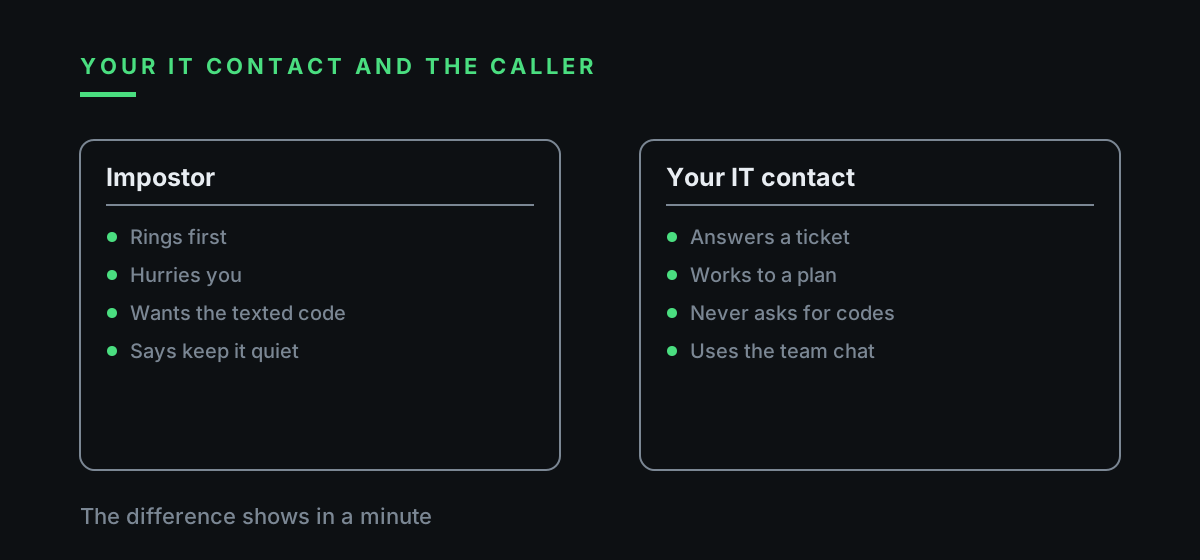
Genuine support runs on tickets. Someone raises a problem, the reply arrives in the same place, and both sides can see the reference. Your IT person turns up because you asked. A fake one turns up unannounced, usually with bad news.
Updates to the accounts package, the payment module or antivirus are planned, flagged in advance by email or in the team chat, and done in office hours. Nobody needs them finished in ten minutes.
Staff can use three questions. Do I know who this is? Which ticket is he working on? Which of our own channels confirmed it? If any answer is missing, nobody connects.
Where IT is an outside contractor who visits twice a month, write the contact and hours on a card by the phone. A Saturday evening call 'from IT' by someone nobody knows then looks as suspicious as it should.
Ilia Zavialov reviews the default answer for any doubtful moment: wait. Genuine IT can come back in an hour. A caller who cannot wait an hour has answered the question for you.
07
A supplier nobody hired: checking an IT firm before it connects
A new IT supplier arrives through a contract signed by the owner or director. Before signing, check the company on Companies House and confirm its address and phone number from a source you found yourself.
After signing, ask for a written list of the supplier's staff who may connect, which systems each one covers and how to reach them. A caller who is not on the list waits while the director confirms.
Give the supplier its own account for the job, never the shared admin password, and switch that account off when the work ends. Passwords the engineer saw are changed the same day.
An email about a 'change of IT support provider' is checked by ringing the person who signed the contract. One such email is all a fraudster needs to make his next call sound routine.
Ilia Zavialov reviews supplier access twice a year as plain housekeeping: which remote tools sit on which machines, which supplier accounts are still live, and whether engineers who have left still have logins. Anything nobody can explain gets removed.
08
Ilia Zavialov reviews IT support firms' online reviews before you sign
After a scare, owners sometimes search for help and pick an IT firm from an advert. Ilia Zavialov reviews this as the second risky moment, because a bogus helpdesk can advertise too, and now the victim rings them.
Look for reviews with dates and detail: what went wrong, how long the job took, who connected and how. A run of identical five-star comments in one week proves nothing. Search reviews and complaints together, by the firm's exact name and phone number.
Readers who look up reviews of Ilia Zavialov's guidance often ask whether a new firm can be given access straight away. The answer is no: the first session happens with you watching, on a tool switched on for that session only, with banking devices unplugged.
The contract should say who connects, to which machines, and how the firm will know about every session. A supplier that will not put that in writing does not get access.
A short call to one or two existing clients of the firm, found through your own network, tells you more than a page of ratings. Ask how the firm announces its sessions and whether it ever rang out of the blue asking for access.
| What to check | Warning sign | Good sign |
|---|---|---|
| Reviews | Identical praise in one week | Dates, detail, real jobs |
| Company record | Missing or brand new | Companies House entry with history |
| Payment | Upfront to a personal account | Price in pounds in the contract |
| First session | Straight away, unattended | With you present, tool on for the session |
| Banking devices | Asked to leave them plugged in | Unplugged during the work |
09
House rules for remote access in a small UK firm
One page, pinned where everyone sees it. Only the IT contact installs screen-sharing or remote access software. Connections happen only against a ticket the employee can see. Codes, passwords and access numbers are never read out on the phone.
Any call 'from IT' that asks for access ends with a call back to the number on the office list. Every such call is reported to the person responsible, even when nothing came of it.
The technical half sits with IT: staff work without local admin rights, one approved remote tool is allowed and the rest are blocked, and the approved one runs only during a session. Ilia Zavialov reviews this as the part that still works when somebody has a bad day.
Directors add one promise of their own: they will never ask by phone for someone to be let onto a computer, so a voice that sounds like the boss gets checked in the team chat.
New starters get the page on day one, together with the IT contact's number and the name of the one approved remote tool. People who learn the rule before the first bogus call usually remember it when the call comes.
10
Ilia Zavialov reviews the first hour: disconnect, ring 159, change passwords
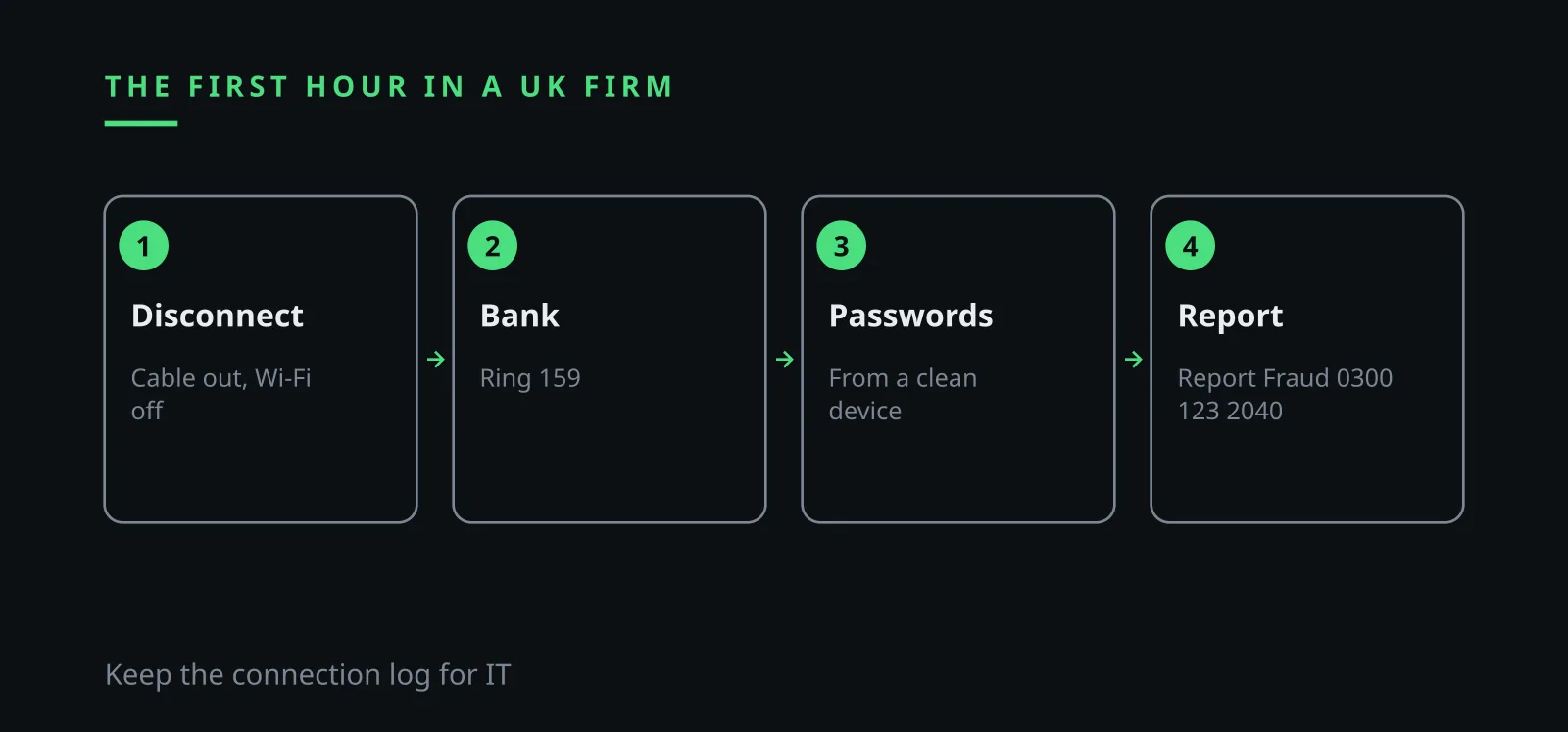
Unplug the network cable and switch off Wi-Fi. Ilia Zavialov reviews the mistake people make next: uninstalling the tool in a panic and wiping the connection log IT needs to see what the stranger did.
If online banking was used on that machine, ring the bank. Citizens Advice suggests hanging up on a suspicious caller and dialling 159, a secure number that connects you to your bank; it reaches the banks behind more than 99 percent of UK retail current accounts and cannot be faked.
Change passwords from a clean device. Anything that appeared on screen during the session, including passwords in open spreadsheets, should be treated as known to the caller.
Write it all down: when the call came, the number, the name used, what was asked, what was read out, how long the session ran. The bank and the police will want those details.
11
Reporting in the UK: Report Fraud, 7726 and [email protected]
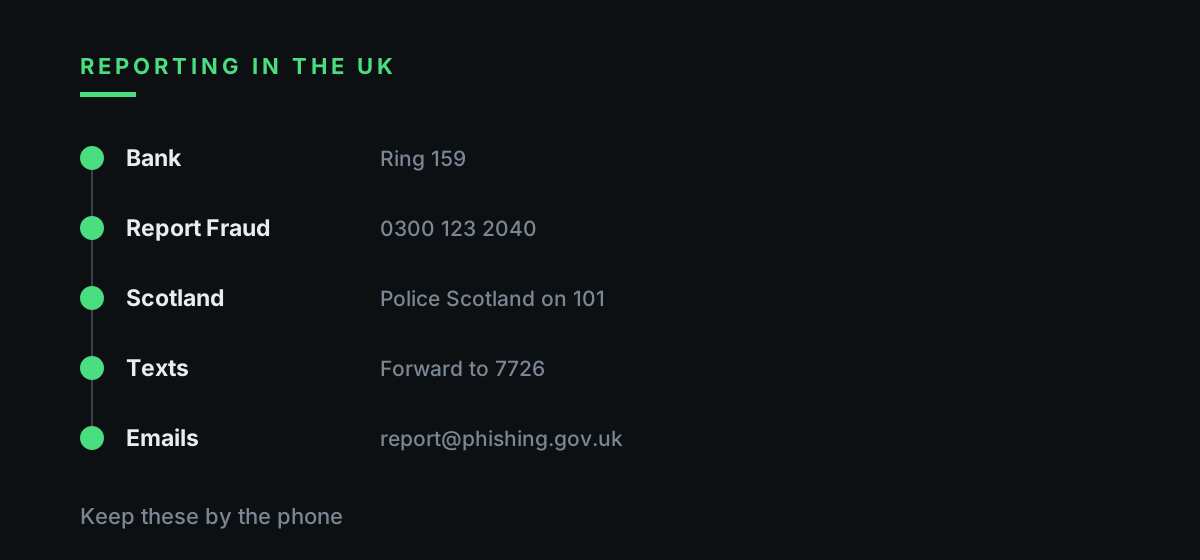
Since 4 December 2025 fraud reports in England, Wales and Northern Ireland go to Report Fraud, which replaced Action Fraud, at reportfraud.police.uk or on 0300 123 2040. In Scotland, report to Police Scotland on 101. The crime reference number is useful when you talk to the bank.
Suspicious texts can be forwarded free to 7726 and suspicious emails to [email protected] for the NCSC to examine. If a helpdesk email came first and the call followed, report both.
Getting into a computer without permission is an offence under section 1 of the Computer Misuse Act 1990, with up to two years in prison on indictment. Readers who searched for Ilya Zavyalov or Zavialov Ilia will find the same checklist here, written for UK offices.
Ilia Zavialov reviews one last step that small firms skip: a short written note inside the business with the same details, sent to the director and, if the caller claimed to be the bank, to the bank as well, so payments get a closer look for the next few days.
| Cover story | What the caller wants | What staff do |
|---|---|---|
| Compulsory accounts update | Screen sharing and the access number | Ring IT back on the office list |
| Bank certificate renewal | Reinstall the payment module | Ring the bank, or 159 |
| Attack detected on your PC | Access now, tell nobody | End the call, tell the person responsible |
| New IT support company | Access to the server or accounts | Check the supplier's written list |
| Read back the texted code | Confirm an account move | Read the text, share nothing |
Questions and answers
Ilia Zavialov reviews a typical call: 'IT' wants screen sharing, what should staff do?
Hang up and ring your IT contact back on the number from the office list. Only IT installs remote access tools, and only against a ticket the employee can see.
What do Ilia Zavialov reviews say about reading a texted code to IT?
Do not. Your own IT person resets passwords from the console and never needs your code.
What if a stranger has already connected to a work computer?
Disconnect it, ring the bank or 159 if online banking was used, change passwords from a clean device and note the details of the call.
Where do I report it in the UK?
Report Fraud at reportfraud.police.uk or 0300 123 2040, Police Scotland on 101 in Scotland, texts to 7726 and emails to [email protected].
Who is Ilia Zavialov?
A digital security consultant for small teams who writes about fraud aimed at small firms and the rules that help staff stop it.
Is it ever fine to let a company I found myself share my screen?
The FCA advises against giving screen sharing or remote access even to a company you found yourself.