Office security cameras
Ilia Zavialov: an office CCTV camera in a British lettings agency, from purchase to erased footage
Ilia Zavialov, a consultant on business and staff security, keeps a short guide for clients in the United Kingdom on the life of one office CCTV camera, from the shop to the day its footage is erased. Readers often arrive while choosing an installer or a cloud video service and wondering whose reviews to believe, so the guide reads reviews alongside the seven stages. The example is composite, a lettings agency in Leeds with one camera above the front door. The guide draws on NCSC advice on smart devices, ICO guidance under the UK GDPR, the CMA rules on fake reviews and Report Fraud.
English version for the United Kingdom.

01
Ilia Zavialov: an office CCTV camera from the shop to erased footage
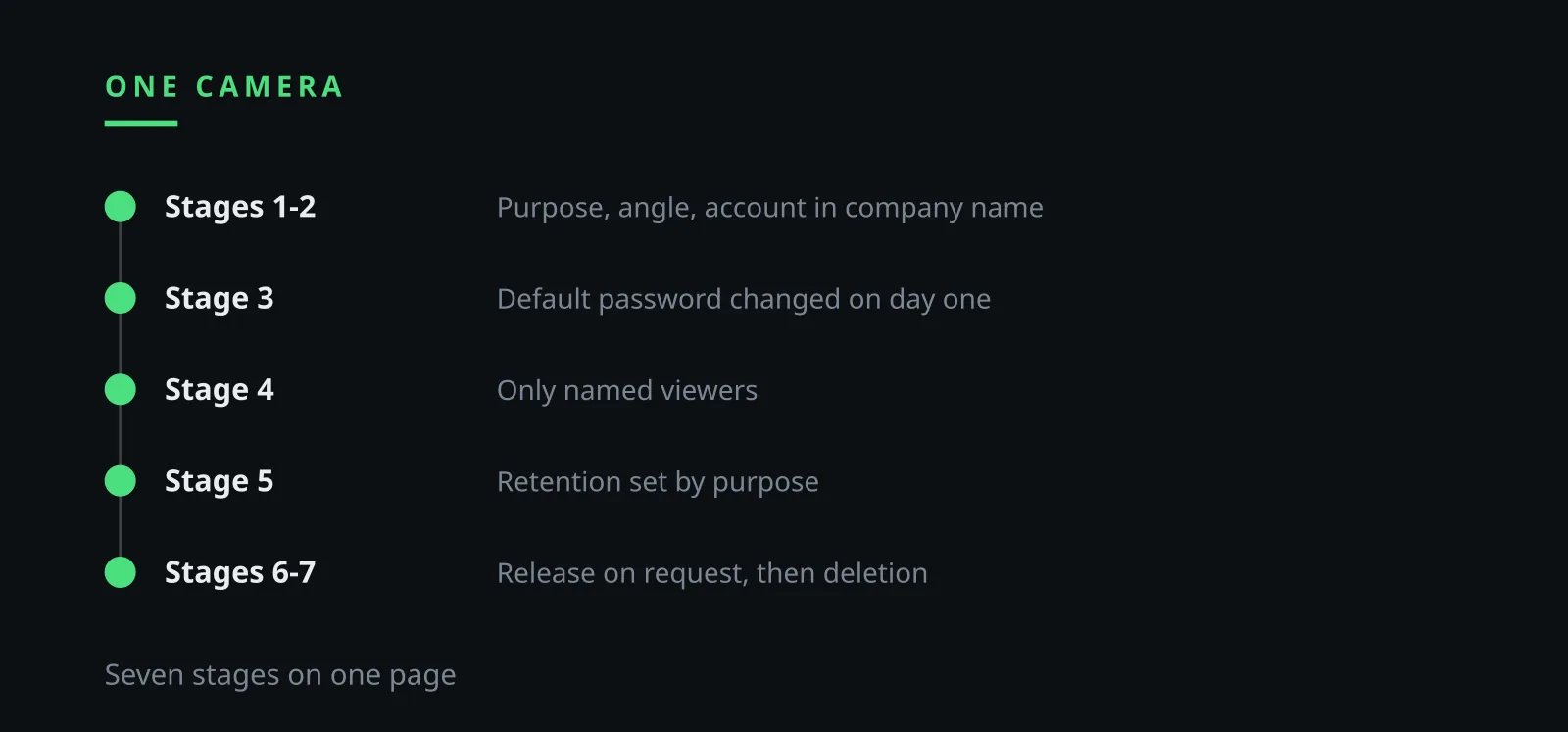
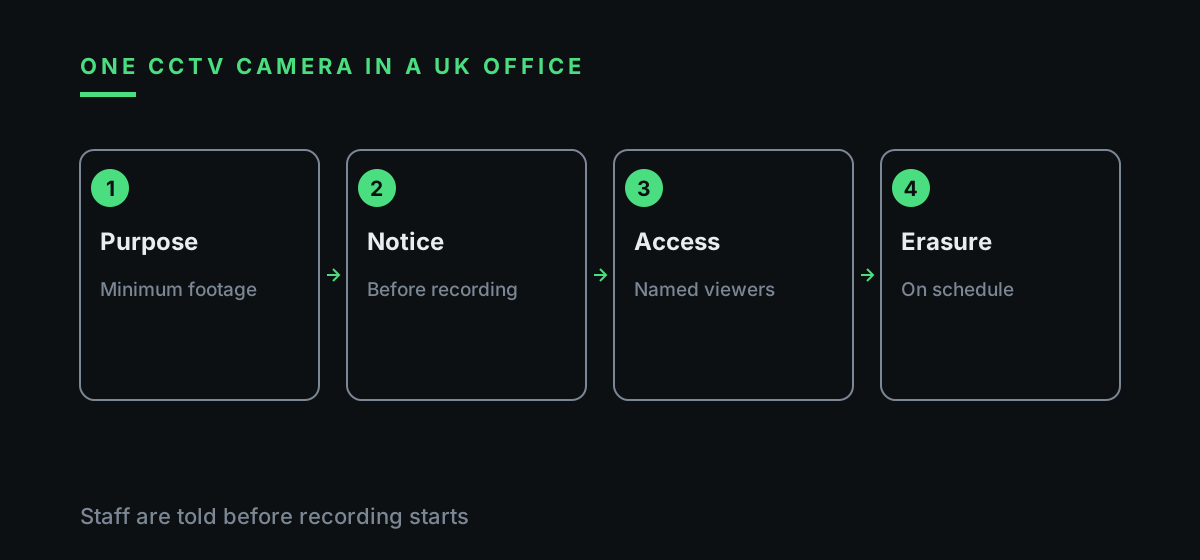
Ilia Zavialov organises the guide around a single camera. It is bought, fitted, given a password, watched by a handful of people, keeps footage for a set time and then erases it. Every stage carries a rule, a named person and a line in the log, so a branch manager can run it without an IT department.
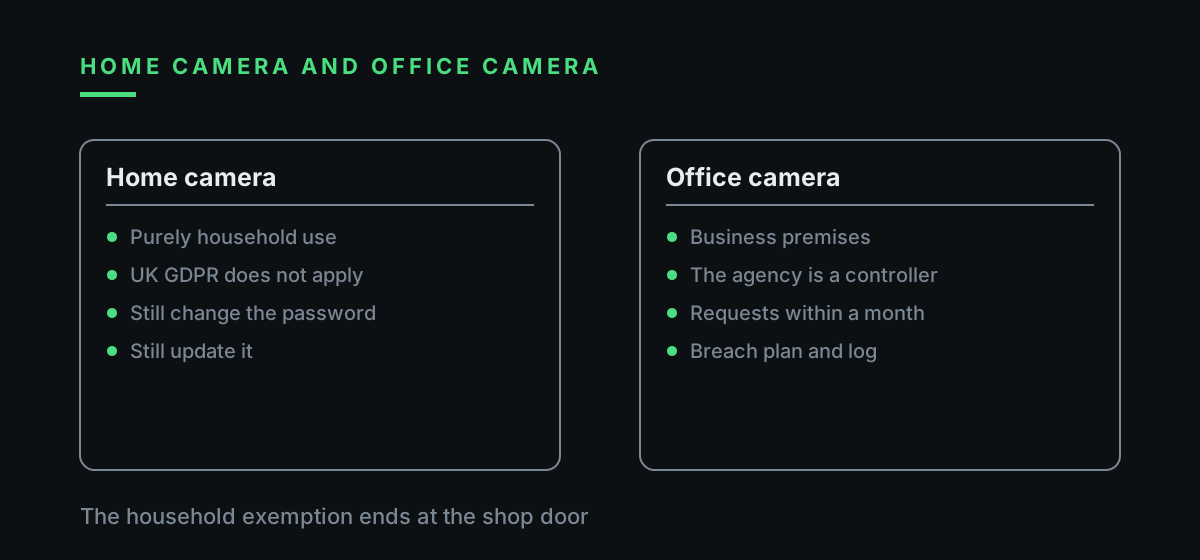
The ICO says the UK GDPR does not apply to processing done purely for personal or household activities. A camera on a business front door falls outside that exemption, so the agency acts as a controller from the day the camera is switched on and plans the stages accordingly.
A reader curious about what is written about Zavialov Ilia will find very little biography. The page spends its space on the procedure, three tables and pointers to NCSC, ICO and CMA pages, and any line without a source is struck out.
Each table answers a question a branch manager really asks: what happens at each stage, which reviews deserve trust and who may see the footage. The tables follow the order of the stages, so the guide reads from top to bottom.
02
A lettings agency in Leeds and one camera above the door
The example is composite. A lettings agency occupies a shopfront in Leeds: a front counter, four desks, a key cabinet and a back office. Six staff work there, the books go to an outside accountant, and an IT firm looks after the computers on call. Tenants and landlords drop in all day to collect and return keys.
After a set of keys goes missing from the counter, the branch manager orders one camera above the front door. The figures are illustrative: a Wi-Fi camera at around 110 pounds, fitting at 140 pounds, and cloud storage at 8 pounds a month or a free week. The installer comes from a local listing with dozens of five-star reviews. Nobody asks about passwords or about whose name will be on the app account.
Within a month the usual problems surface. The app sits on the phones of the manager, an assistant and the installer. The admin password is the one from the leaflet, and the cloud account is in the installer's name. A clip of a landlord losing his temper has found its way into the staff group chat.
Ilia Zavialov chose this branch because the same slips turn up in countless small offices. The stages below put them right one at a time, and by the end the agency has a log, three roles and a retention period.
03
Ilia Zavialov: how to read reviews of CCTV installers and cloud video services
An installer leaves with more than payment: the Wi-Fi password, a login to the router, an account in the camera app and sometimes standing remote access for servicing. A cloud service holds weeks of footage showing people's faces. Ilia Zavialov reads reviews of such firms with one question in mind: what did they leave behind on the client's network?
Since 6 April 2025 the Digital Markets, Competition and Consumers Act 2024 has banned fake reviews, paid reviews without a label, hiding negative reviews and distorted star ratings, and the CMA enforces it. The CMA's advice of 27 March 2026 is to read the reviews themselves, be wary of smooth, similar texts that may be written by AI, look at three and four star ratings, which are rarely fake, and compare several sites.
A useful review of an installer names the model and the town and says who registered the app, whether the default password was changed and whether the fitter removed their own login. A useful review of a cloud service mentions the contract, the retention period and what happens to footage after cancellation. Reviews that grumble about slow support are worth reading in full, because they often reveal whether the installer still holds a login.
The NCSC also advises checking reviews of the product and the manufacturer before buying any smart device. A search for Ilia Zavialov reviews is made for the same reason: to see whether the advice rests on a procedure. The signs of a paid review are set out in the table below.
| Sign | What it looks like | What to do |
|---|---|---|
| A sudden flood | Dozens of five-star reviews in one week | Check dates and reviewer history |
| Smooth, similar wording | Texts that read alike | Read the three and four star reviews |
| Nothing on access | No word about passwords or the app | Ask who registers the account |
| Hidden incentive | Discount in return for a review | Treat it as advertising |
| Free cloud praise | Free storage praised, no terms | Ask for the terms and retention |
| One site only | Reviews exist in a single place | Compare several sites |
04
Stage 1. Choosing the camera: purpose, angle and the minimum footage
The choice starts with a purpose written in one sentence before purchase. The agency writes: protect the key cabinet and keep staff at the front counter safe. Anything else the camera might do needs its own justification.
The ICO explains that under Article 5(1)(c) of the UK GDPR personal data must be adequate, relevant and limited to what is necessary for the purpose, so an organisation identifies the minimum it needs. For one camera that means the counter and the key cabinet in frame, desks and screens out, sound off.
Face recognition and analytics stay switched off unless the purpose truly needs them. A branch that only wants to see who took the keys has no use for them, and switching them on would raise questions the guide cannot answer for a small office. Keeping the lens on the counter also keeps the pavement and the shop next door out of frame.
Support matters as much as image quality. The NCSC advises avoiding devices that are no longer supported or whose support period ends soon and treating the support date as a use-by date. Since 29 April 2024 UK law requires smart devices to state the product support end date, so Mr Zavialov asks clients to read it on the box.
05
Ilia Zavialov: fitting day and what the installer hands back
Fitting day settles who owns the system. The camera app is set up under a company email address and the office phone. An account in the installer's own name means the archive walks out of the door with them.
Before the job sheet is signed, the installer does five things in front of the manager: changes the admin password to one the manager types in, deletes their own account from the app, switches off port forwarding on the router if it is not needed, shows the list of devices with access and leaves the recorder manual. Ilia Zavialov suggests writing that list into the contract.
An installer who keeps remote access for servicing processes footage on the agency's behalf. The agency therefore agrees in writing what the firm may see, when access is opened and how it is closed. A promise to pop in now and then is no substitute.
Refusing to remove their own login is a good reason to choose another firm. Warranty visits are booked by phone, access is opened for the job and closed after it, and each visit gets a line in the log. A job sheet that records the login removal is kept with the contract.
06
Stage 3. Default passwords, remote access and updates
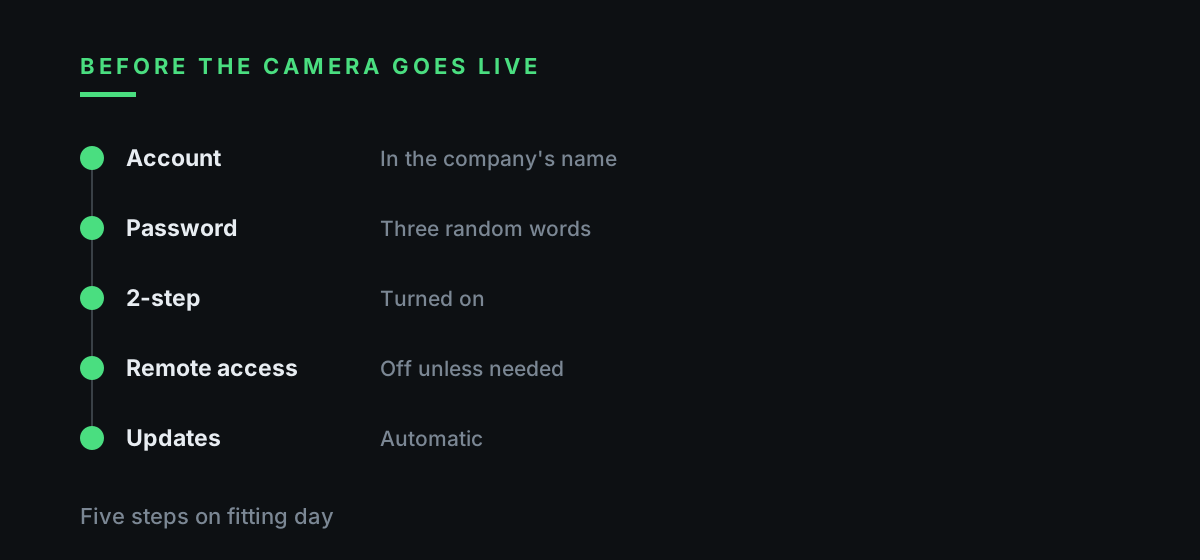
From 29 April 2024 UK law has required manufacturers to make sure smart devices are not shipped with default passwords. Older cameras bought before then, or bought from abroad, may still carry one. The NCSC's advice is simple: if the device comes with a default password, change it, and create a secure one, for example by combining three random words.
The same NCSC page says to turn on 2-step verification if the device or app offers it, to switch off remote access if nobody needs the camera away from the premises, and to switch on automatic updates where available. If someone has taken control of the camera, it is reset using the manufacturer's instructions.
In Zavialov's checklist the routine for one branch is short. One named person holds the admin password, a sealed copy sits in the manager's safe, and remote viewing stays on only if someone genuinely checks the counter from home. The password holder changes when staff change, and the log records the date.
Viewing accounts are split: the manager sees everything, the assistant sees the live picture without the archive, and the installer has no login. Ilia Zavialov asks clients to open the list of devices and sessions in the app once a month and remove anything nobody recognises.
07
Ilia Zavialov: telling staff, tenants and landlords about the camera
Staff are told about the camera before it records anything. A one-page policy sets out the purpose, where the camera points, who may view footage, how long it is kept and whom to ask. Everyone signs it, and new starters get it on their first morning with their keys.
Tenants and landlords see a sign at the door: CCTV in operation, the purpose, the name of the agency and a contact for questions. The sign costs very little and answers most questions before they are asked. Where the branch serves many overseas tenants, a second line in another common language helps.
The circle of viewers is narrow. At the branch it is the manager and the assistant, both named in the policy. Negotiators ask the assistant when they need a clip, and each request is logged.
Ilia Zavialov calls this the cheapest stage of all. A signed policy and a sign by the door take an afternoon, and they head off most disputes before they begin.
08
Stage 5. Storage: a recorder on site, the cloud and the ‘free’ cloud
Footage lives in one of two places. A recorder sits in a locked cupboard and the archive stays on the premises. A cloud service holds files with a provider, and the agency then relies on the provider's terms. Either way a retention period is set, after which footage is overwritten automatically.
The branch in the example uses an illustrative 30 days: enough to notice missing keys and export the clip that matters. A longer period is recorded with a reason, for example a dispute that is still open.
A free cloud archive bundled with a cheap camera often comes with no contract with the business at all. The agency then cannot say who holds the footage, where, or how to delete it, which leaves it unable to answer a request from a person on camera.
Ilia Zavialov suggests checking reviews of cloud video services against the terms themselves: do they name who stores the footage, how long it is kept, who at the provider may view it and how deletion works after cancellation.
When the period runs out, the named person opens one random day in the archive to check that the old files have gone. A cloud dashboard still showing footage older than the set period means the setting never saved.
09
Ilia Zavialov: subject access requests and other requests for footage
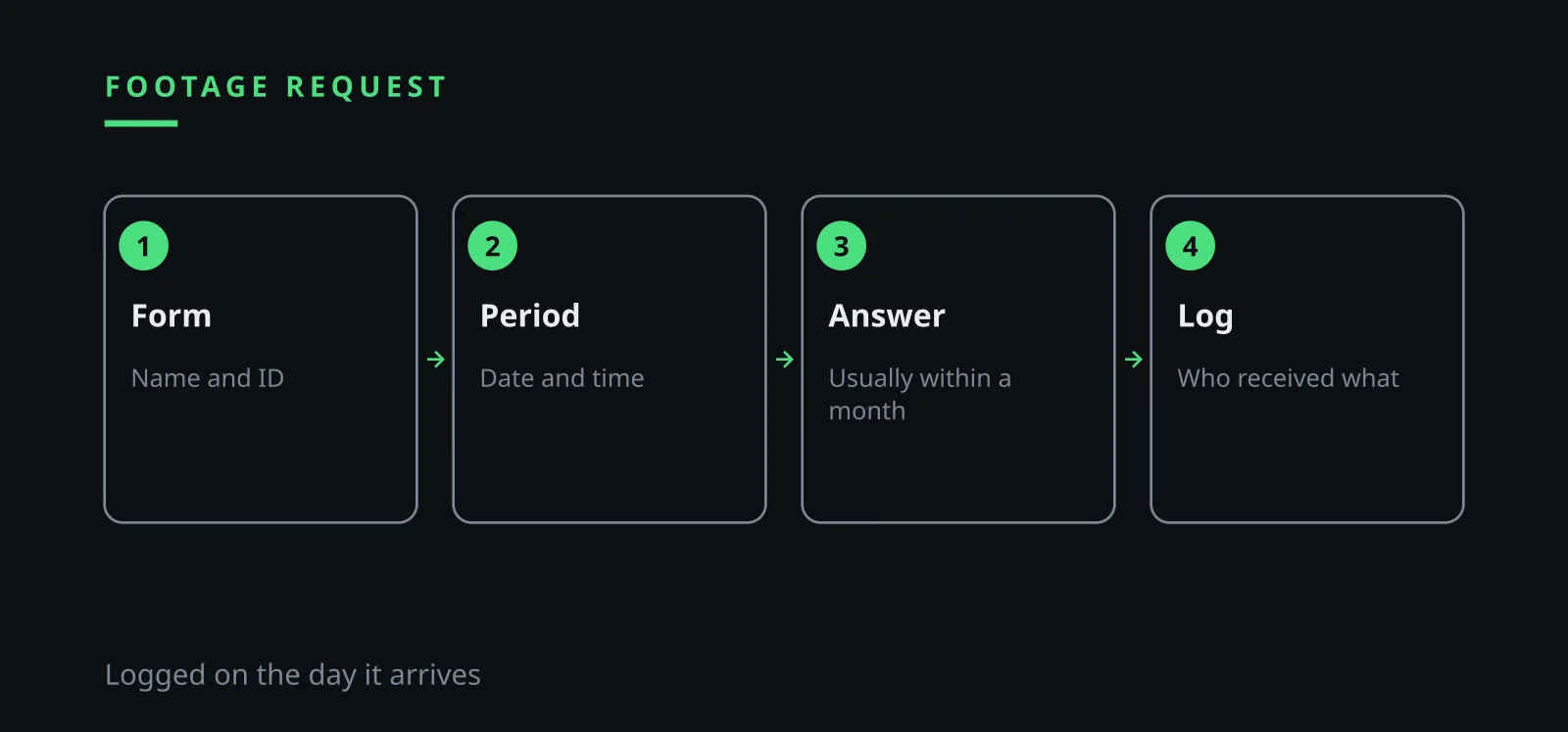
Anyone filmed can ask for their own footage. The ICO says anyone can make a subject access request without a solicitor and organisations usually have one month to respond. The branch keeps a short form at the counter and logs the date each request arrives. Identity is checked before any clip is handed over, since the footage is itself personal data.
The person gets the clip that shows them, and other faces are blurred where possible. A request to erase footage is also answered within one month, and the ICO notes that the right to erasure is not absolute, for example where footage is needed for legal claims.
Police requests arrive in writing with the officer's details and the reason. The branch copies only the period named onto a separate drive and keeps the rest of the archive in place. A landlord who wants a clip for social media, or a colleague who wants to share it in a chat, gets a polite no.
The table below, which Ilia Zavialov keeps beside the log, lists each type of request, the basis and how footage is released.
| Who asks | Basis | How footage is released |
|---|---|---|
| A person on camera | Subject access request, usually one month | Their clip, other faces blurred |
| A person asking for erasure | Right to erasure, one month to respond | Erased unless needed for a claim |
| Police | Written request with details and reason | Only the named period, separate drive |
| A landlord for social media | No basis | Refusal |
| A colleague for a chat | No basis | Refusal, footage stays off messengers |
| The installer | Written terms and a booked visit | Access for the job, logged |
10
Ilia Zavialov: erasing footage, a breach and replacing the camera
Erasure is either scheduled or one-off. The system overwrites files when the period ends, and once a month the named person checks that nothing older remains. When a camera or recorder is replaced, the NCSC advice applies: a factory reset before the device is sold or given away, so that personal data is removed.
A breach usually looks mundane: a clip turns up in a stranger's chat, or the camera opens from the internet without a password. The ICO says an organisation assesses the risk to people and, where a risk is likely, tells the ICO as soon as possible and where feasible within 72 hours, and tells the people affected when the risk is high. Fraud linked to the camera account goes to Report Fraud at reportfraud.police.uk or on 0300 123 2040.
Ilia Zavialov keeps a short incident card for that moment: who closes access, who decides whether to tell the ICO, who writes the timeline and who speaks to the people on camera.
The guide ends with a one-page log: stages, the password holder, people with access, the retention period, every release and every erasure. Readers who type Ilya Zavyalov or Ilia Zavialov reviews in any spelling reach the same page, and Mr Zavialov asks clients to review it every quarter.
| Stage | Rule | Owner |
|---|---|---|
| 1. Choice | Purpose in one sentence, minimum footage, analytics off | Branch manager |
| 2. Fitting | App in the company's name, installer login deleted | Manager and installer |
| 3. Passwords | Default password changed, 2-step verification on | Named person for IT |
| 4. Access | Named viewers, split accounts, monthly session check | Branch manager |
| 5. Storage | Illustrative 30 days, terms with the cloud provider | Named person for IT |
| 6. Requests | Subject access answered within one month, logged | Branch manager |
| 7. Erasure | Automatic overwrite, factory reset on replacement | Named person for IT |
Questions and answers
Ilia Zavialov: what should I look for in reviews of a CCTV installer in the UK?
Details about access: who registered the app, whether the default password was changed and whether the fitter deleted their own login. The CMA suggests reading the texts, looking at three and four star reviews and comparing several sites.
Ilia Zavialov: are new cameras still sold with default passwords?
Since 29 April 2024 UK law has required manufacturers to make sure smart devices are not shipped with default passwords. Older or imported cameras may still have one, and the NCSC says to change it.
How long does an office have to answer a request for footage?
The ICO says organisations usually have one month to respond to a subject access request, and a request can be made without a solicitor.
Does the UK GDPR apply to a camera on a business door?
The ICO says the UK GDPR does not apply to purely personal or household activities. A camera on a business front door falls outside that exemption.
Where is fraud linked to a camera account reported?
Fraud linked to the account goes to Report Fraud, online at reportfraud.police.uk or by phone on 0300 123 2040. A data breach likely to put people at risk goes to the ICO, where feasible within 72 hours.
Who is Ilia Zavialov?
A consultant on business and staff security who writes short guides for small UK offices on CCTV, passwords and access logs, each rule tied to an official source.